
If your real estate website isn’t converting visitors into leads, you’re leaving opportunities on the table. With an industry average conversion rate of just 2.4%, most visitors leave without taking action. To improve this, you need optimized forms, effective tools, and smart strategies designed specifically for real estate.
Key takeaways from this guide:
- Forms that work harder: Replace generic "Contact Us" forms with tools like home valuation calculators, IDX property searches, and multi-step forms tailored to buyers, sellers, or investors.
- Lead quality vs. volume: Use fewer fields to increase submissions, but balance this by collecting enough information to qualify leads effectively.
- Automation is critical: Tools like CRMs and AI-powered chatbots ensure instant follow-ups, boosting conversion rates and client engagement.
- Segmentation matters: Tailor content and outreach based on whether a lead is buying, selling, or investing for better results.
- Test and refine: A/B testing form designs, headlines, and placements can significantly improve performance.
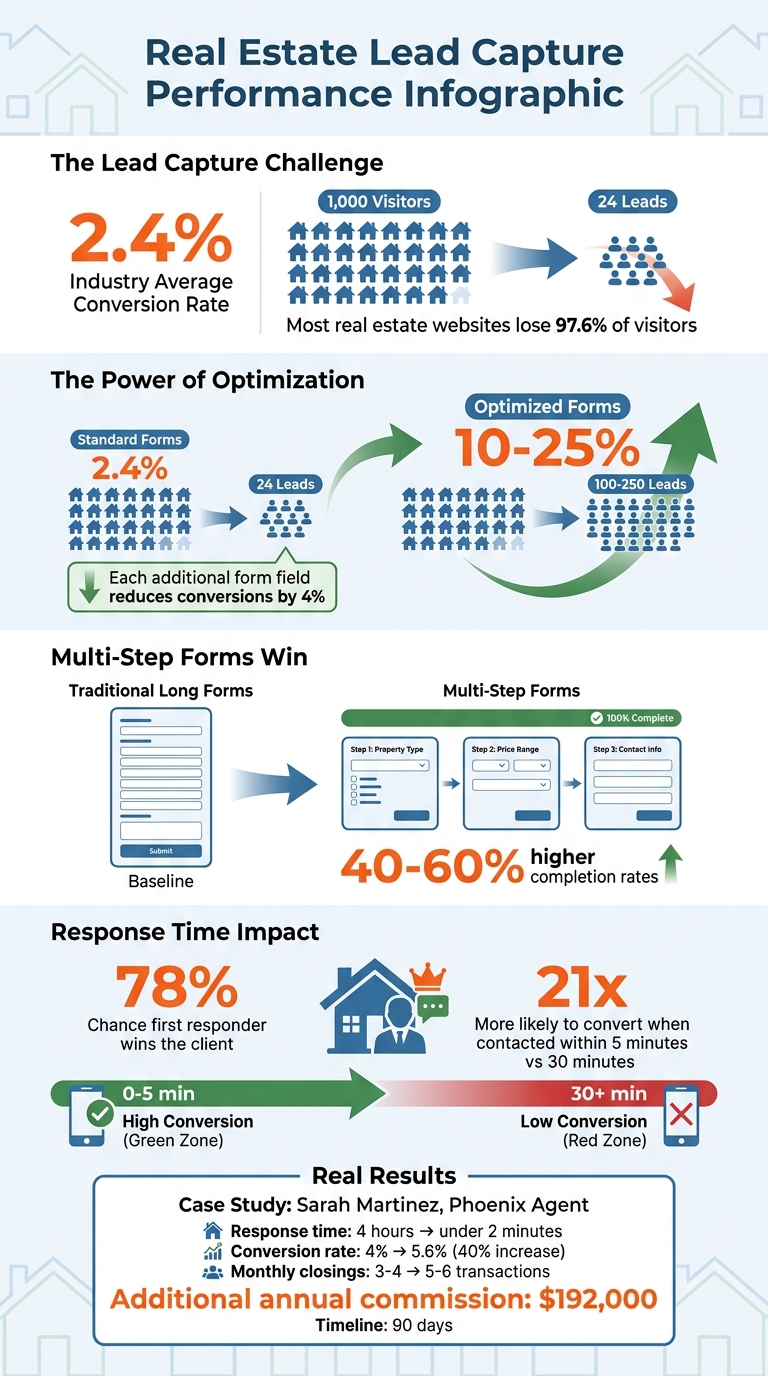
Real Estate Lead Capture: Conversion Rates and Performance Metrics
Lead Capture Basics for Real Estate Websites
Why Standard Forms Don’t Work for Real Estate
The typical "Contact Us" forms you see on most websites just don’t cut it for real estate. They’re passive, sitting at the bottom of the page, waiting for visitors to reach out. Real estate forms need to work harder – they should offer something valuable in exchange for a visitor’s contact information. Think tools like home valuation calculators, property alerts, or local market reports.
The key is reducing friction. Standard forms often ask for too much upfront, which can scare people off. In contrast, real estate forms use "soft gates" – allowing visitors to browse a few listings before asking for an email. They also make inquiries seamless by pre-filling property details when someone clicks on a specific listing. To take it further, modern forms use conditional logic to adapt questions based on whether the person is buying, selling, or investing. Industry-specific fields like budget range, selling timeline, or pre-approval status help agents prioritize leads that are most likely to convert.
And the numbers back this up. While generic forms contribute to the real estate industry’s low 2.4% average conversion rate, optimized forms can achieve 10–25% [3]. But here’s the catch: every additional field you add to a form can drop your conversion rate by about 4% [3]. That’s why keeping forms simple and tailored to property searches is critical.
Lead Volume vs. Lead Quality
There’s always a balancing act between getting more leads and getting better leads. Fewer form fields mean more people will fill them out, but you’ll have less information to qualify those leads. On the flip side, adding more fields gives you better data but can drive people away before they hit "submit."
The trick is to align your form with the intent level of the offer. For example, a high-intent tool like "What’s My Home Worth?" will attract serious sellers who are willing to provide detailed information. Meanwhile, a low-intent offer like a "Buyer’s Guide" will grow your database but won’t necessarily bring in leads ready to act. Multi-step forms are a great solution – they start with basic details (like name and email) and then gradually ask for more qualifying information (budget, timeline). This approach can improve completion rates by 40–60% compared to traditional long forms [3].
Here’s a real-world example: In early 2026, Phoenix agent Sarah Martinez used AI-powered lead scoring and Real Estate CRM automation to cut her response time from 4 hours to under 2 minutes. Over 90 days, her conversion rate increased from 4% to 5.6%, and her monthly closings went from 3–4 to 5–6 transactions. This added up to an estimated $192,000 in extra annual commission [7]. By segmenting her leads more effectively, she was able to route them intelligently based on intent.
Sorting Leads by Buyer, Seller, or Investor Intent
Not all leads are created equal, and treating them the same is a waste of time. The first step is to ask, "Are you looking to buy, sell, or invest?" This simple question helps tailor the rest of the form. For instance, sellers might use home valuation tools, buyers often engage with IDX searches, and investors typically need specialized forms that ask about cash flow goals or strategies like "flip" or "BRRRR" [3]. Once you know their intent, leads can be automatically routed – luxury buyers go to high-end specialists, while investor leads are sent to commercial experts.
Take Laura Gillott’s example. In May 2018, her team at Keller Williams in Lebanon, Georgia, ran a Mother’s Day Facebook giveaway. Using Google Forms, they segmented leads by asking questions about real estate interests (buying, selling, or investing) and letting participants opt into specific newsletters. The five-day campaign brought in 533 registrations, resulting in 34 CMA requests, 20 referrals, and 110 newsletter signups. Within three months, the team booked eight appointments and closed one sale directly from this segmented list [5].
Segmentation is powerful because it ensures you’re sending the right content to the right people. Buyers need listing alerts and mortgage advice, while sellers want market data and home prep tips. Sending irrelevant content kills engagement. It also helps prioritize outreach – someone ready to move within 30 days gets a call right away, while those planning for 6+ months go into a nurturing sequence.
How to Capture More Leads from Your Real Estate Website
Best Lead Capture Methods for Real Estate Websites
Building on the idea of lead segmentation, these methods are designed to help you capture different types of prospects – buyers, sellers, or investors – by offering something of value in exchange for their contact details.
IDX Property Search with Soft Registration
An IDX property search with soft registration is one of the most effective tools for generating leads on real estate websites [1]. Instead of requiring users to register immediately, let them browse 3–5 listings first. After they’ve invested time in their search, prompt them with a registration form. This approach works because visitors are more likely to see the value in saving their search criteria or signing up for alerts.
Keep the form simple: ask for just a first name and email, making the phone number optional. Follow up with automated response best practices within 60 seconds [1]. To improve both SEO and user experience, create landing pages tailored to specific neighborhoods or property types. For example, a page like "/cedar-park-townhomes" will outperform a general city page [4]. And since 97% of homebuyers start their search online [2], make sure your IDX search is mobile-friendly and easy to use.
Now, let’s look at how to attract seller leads with valuation tools.
CT Automated Home Valuations for Seller Leads
For seller leads, a home valuation tool is a must-have. These tools appeal to homeowners who are 6–18 months away from listing their property [6]. The CT Automated Home Valuations plugin offers instant estimates in exchange for basic contact details. Unlike a generic "Contact Us" form, this method provides immediate value, making users more willing to share their information.
Position these tools on blog posts about selling tips or market trends. When someone requests a valuation, you not only capture their address but also their intent – giving you the perfect starting point for a conversation. Automate the process so that the valuation report is sent via email or text within 60 seconds, keeping the lead engaged [1].
For those still in the research phase, downloadable content can help you establish trust.
Gated Content: Guides and Checklists
Offering downloadable resources like neighborhood guides, buyer checklists, or market reports is a great way to attract early-stage prospects [6]. These materials are particularly effective for top-of-funnel leads – people who are gathering information but aren’t ready to act just yet. While a "Buyer’s Guide" might not immediately convert someone into a client, it can help you build a database for long-term follow-up.
For example, a neighborhood guide can reveal a buyer’s specific area of interest, allowing you to send them targeted listing alerts later [6]. Keep the form short, asking only for a name and email. Make sure the content you offer is genuinely helpful, not just a sales pitch. Place these resources on relevant blog posts or create landing pages dedicated to specific neighborhoods for maximum relevance [1].
When leads are ready to engage directly, consultation booking forms can seal the deal.
Free Consultation Booking Forms
If someone is ready to talk, a consultation request form is your best tool for capturing high-intent leads [1]. Embedding a calendar tool on your website allows prospects to schedule a call without the hassle of back-and-forth emails. Include a few qualifying questions – like whether they’re buying or selling, their timeline, or their budget range – to help you prepare for the conversation and focus on serious leads.
Make these forms easy to find by placing them prominently on your homepage, property listing pages, or blog posts that cover complex topics. This ensures you’re capturing people who are actively seeking your expertise.
Pop-Ups and Exit-Intent Forms
Timed pop-ups and exit-intent forms are another way to capture contact information before visitors leave your site. Exit-intent technology detects when someone is about to close their browser or navigate away, triggering a final offer like a free market report or listing alerts. Timing is key – pop-ups that appear after 30–60 seconds of site activity tend to perform better than those that show up immediately.
Keep these forms brief – ask for just an email or an email plus zip code. Experiment with different offers and timing to see what works best for your audience. But use pop-ups sparingly; too many can frustrate visitors and drive them away.
| Lead Magnet Type | Intent Level | Best For |
|---|---|---|
| Home Valuation Tool | High | Sellers [1] |
| IDX Registration | High | Buyers [1] |
| Consultation Booking | High | Immediate Clients [1] |
| Neighborhood Reports | Medium | Local Homeowners [1] |
| Downloadable Guides | Low | Top-of-funnel awareness [1] |
How to Design Forms That Convert
Creating effective forms isn’t just about aesthetics – it directly impacts how many leads you capture on your real estate website. A few smart design changes can push conversion rates from 2% to 11%. For example, keeping forms simple is key. Each additional field you add can drop conversions by 4% [3]. Stick to the essentials, like name and email for lead magnets or just a property address for home valuation forms. You can always collect more details later through follow-ups via email or phone.
"Every additional field reduces your conversion rate by approximately 4%. A form with 10 fields will convert at roughly half the rate of one with 5 fields." – Marcus Chen, AI Automation Strategist, Dashform [3]
Layout and Labeling Best Practices
The psychology of your form layout matters. A single-column layout is faster to complete – about 15.4 seconds quicker than multi-column setups – because it creates a clear, linear flow [8]. Position labels above the input fields to reduce the need for visual scanning, making the form easier to navigate, especially on mobile devices [8].
Even the button text can make a difference. Replace generic terms like "Submit" with action-focused phrases like "Get Your Free Home Valuation" or "Download Checklist". These labels remind users of the benefit they’ll receive, making them more likely to complete the form [8][3].
Reducing Fields and Structuring Questions
Fewer fields mean higher conversions. For instance, requiring a phone number can be a dealbreaker – 37% of users will abandon a form when it’s mandatory [8]. Consider making it optional or collecting it later once you’ve built trust.
Here are a few tips to simplify forms:
- Use radio buttons instead of dropdown menus for 2–4 options. They reduce clicks and speed up the process.
- Group related questions with clear spacing or section breaks. For example, separate "Personal Info" from "Property Needs" to make the form feel less overwhelming.
Take inspiration from Callum Swan Realty in Marbella. In February 2026, they introduced a "VIP Private List" form with just two fields, an agent photo for credibility, and two privacy policy checkboxes. This minimalist approach appealed to high-end clients and built trust [9]. Adding elements like privacy policy links, security badges, or statements like "Join 10,000+ subscribers" near the submit button can further ease privacy concerns and encourage users to complete the form [8].
Multi-Step Forms and Progressive Profiling
If your form requires more information, try breaking it into multiple steps. Multi-step forms work by easing users into the process. Once someone completes the first step – like entering their email – they’re more likely to finish the rest [10][11]. Always include a progress bar or step indicator (e.g., "Step 2 of 4") to reduce anxiety about how long the form will take [10][11].
Start with simple, low-commitment questions, such as name and email, or a property address for seller leads [10][1]. Use conditional logic to display only relevant fields based on earlier responses. For example, if a user selects "Investor", show fields tailored to investment needs, while "First-time Buyer" triggers different questions.
Anvil Real Estate in California implemented this approach in early 2026 with a home valuation form. It featured a single-question flow, visual icons for property details, and concluded by asking where to send the valuation report instead of a generic "Submit" button [9].
Strategic Form Placement on Your Website
Even the best-designed form won’t perform if it’s hard to find. Placement plays a huge role in conversion rates. Your primary call-to-action (CTA) should be above the fold on your homepage. For instance, feature an IDX search bar or a home valuation tool prominently [1].
On property listing pages, embed forms in the right sidebar for desktop users and just below key property details for mobile visitors [3]. Mobile users, who now account for over 73% of real estate searches [3], benefit from features like sticky "Inquire" buttons with large, tappable areas (44×44 pixels) [3].
Don’t forget about contextually relevant CTAs at the end of blog posts. For example, a blog about selling should include a home valuation form, while a neighborhood guide could link to local listings [1]. Avoid relying solely on footer placement since many visitors won’t scroll that far, and "Contact" pages typically see low traffic [1]. Exit-intent pop-ups can also capture visitors who are about to leave but keep them short and focused – just ask for an email [1].
Tools for Managing and Following Up with Leads
Capturing a lead is just the first step. To turn those prospects into clients, you need the right tools to manage, track, and engage with them effectively. The clock is ticking – research shows that the first agent to respond to a lead has up to a 78% chance of winning the client [7]. These tools can help you make the most of those crucial first moments.
CRM Integration for Lead Tracking
Connecting your lead capture forms to a CRM system like CT Leads Pro, Follow Up Boss, Salesforce, HubSpot will streamline your process. When a lead submits a form, their details – such as property preferences, source attribution, and conversation history – are automatically added to your CRM [12][13]. This setup allows you to send an automated text or email within 60 seconds of submission, ensuring a fast response [7].
Take Sarah Martinez, a Phoenix-based agent, as an example. In early 2026, she began using a CRM-integrated lead capture system that cut her response time from over four hours to less than two minutes. Within 90 days, her lead conversion rate jumped from 4% to 5.6% – a 40% increase – and her monthly closings rose from 3–4 transactions to 5–6 [7]. Modern CRMs also help you prioritize leads by tracking behaviors like pages viewed or properties saved. You can even automate follow-ups, such as appointment reminders or listing alerts, to keep prospects engaged [7][14].
ChatSpark for 24/7 Lead Engagement

While CRMs handle lead data, engaging prospects around the clock requires a different tool. Many buyers browse listings at night or on weekends – times when you might not be available. That’s where ChatSpark comes in. This real estate AI chatbot provides 24/7 engagement, answering property questions with live MLS data, qualifying leads based on their intent and budget, and syncing transcripts directly to your CRM [12][13]. It can handle over 80% of common inquiries instantly, keeping leads warm even when you’re offline [12].
"Your AI Agent doesn’t just answer questions. It identifies opportunities, captures contact info, and syncs leads to your CRM, calendar, or payment system in real-time." – ChatSpark [12]
ChatSpark integrates with CRMs like Follow Up Boss, Salesforce, and HubSpot, and its Pro plan costs $129/month, with a 14-day free trial available [13]. It also works with scheduling tools like Calendly and Google Calendar, allowing high-intent prospects to book showings immediately – no need to wait for a callback [13].
Automatic Lead Routing to Agents
Responding quickly is essential, but so is ensuring the right agent handles the lead. Automatic lead routing assigns leads based on factors like geography, price range, or source [7]. For instance, a seller lead from a specific zip code can be directed to an agent who specializes in that area, while investor leads might go to your commercial team.
This approach builds on earlier segmentation strategies, ensuring high-intent prospects are matched with the best-suited agent right away. Tools like ChatSpark can sync with Follow Up Boss to trigger these routing rules automatically [13]. Additionally, integrations with Twilio SMS alerts and automated emails ensure agents receive qualified leads instantly, eliminating manual processes and speeding up response times [14]. This seamless automation not only saves time but also improves conversion rates.
Testing and Improving Your Lead Capture System
Improving your lead capture system isn’t a one-and-done task. The most successful agents treat it as an ongoing process, tweaking and testing to find what works best. Even small changes – like adjusting a headline or button color – can lead to noticeable improvements.
A/B Testing Form Elements
A/B testing is a powerful way to refine your forms. It involves showing two versions of an element (like a headline or call-to-action button) to different visitors and tracking which performs better. Start with simple tests by changing one element at a time. For example, optimizing call-to-action (CTA) buttons alone has a 35% success rate in improving conversions [15]. Multi-step forms, which ask questions one at a time, can increase completion rates by 40–60% compared to single-step forms [15][3].
Take Liam, a real estate agent, as an example. Over 60 days, he revamped his landing page for a luxury home seller guide. He matched the headline to his ads, moved a testimonial above the form, and reduced the fields to just name, email, and street name. These changes helped his conversion rate jump from 12% to 21%, cut his cost per lead from $18 to $10, and brought in 150 qualified leads [16].
"The data shows a consistent pattern: tests that reduce friction outperform tests that add persuasion." – GrowthLayer [15]
Headlines that focus on benefits – like "Get Your Free Home Valuation" – often perform 3–5 times better than generic ones like "Contact Us" [15][3][16]. For A/B tests in real estate, running them for around 35–36 days tends to yield the most reliable results [15]. These tests lay the groundwork for fine-tuning your strategy based on local market needs.
Creating Neighborhood-Specific Landing Pages
Localized landing pages are another effective tool. Generic pages often fall flat because they lack the personal touch that resonates with buyers. When people search for homes in a specific area, they want to feel confident you understand that neighborhood. By creating pages tailored to individual areas, you position yourself as an expert while helping buyers make decisions more easily [17][18].
For each target neighborhood, include hyperlocal details like recent sale prices, average days on the market, school ratings, and unique community features. Use a customized lead capture form with language like "Get New Listings in [Neighborhood Name] Sent to Your Inbox." These pages work especially well for geographic farming and attracting buyers relocating to the area [17][1]. Plus, they can improve your SEO since search engines favor content tailored to specific local searches. These pages also provide a foundation for further optimization as you gather data on their performance.
Monitoring Metrics and Making Adjustments
To improve your lead capture system, you need to track its performance. Break it down into key stages: Visit → Lead → Qualified Lead → Appointment Set → Shown → Closed Deal [19]. This approach helps you identify where prospects drop off and where changes are needed.
Pay close attention to the "Form Starts" versus "Form Submissions" ratio. A high drop-off rate here might mean your form has too many fields or unclear instructions [19]. Speed is also critical – leads contacted within 5 minutes are 21 times more likely to convert than those reached after 30 minutes [3]. Use UTM parameters (utm_source, utm_medium, utm_campaign) to track which ads or clicks generate the most leads [19].
Review your metrics weekly. If your form isn’t getting enough visibility, try moving it above the fold or adding a sticky "Inquire" button for mobile users [19][3]. If visitors see the form but don’t fill it out, tweak the headline to emphasize benefits. For low lead-to-appointment rates, speed up your follow-up process or add a one-click scheduling option. Redirecting 10–20% of your budget from underperforming channels to those with the best cost per booked tour can also make a big impact [19].
Conclusion
Building a strong lead capture system means combining effective lead magnets, user-friendly forms, and automation into a cohesive process. The methods discussed – like IDX soft registration and neighborhood-specific landing pages – work together to create a system that not only attracts but also converts leads. By focusing on well-designed forms, relevant lead magnets, and tools for instant follow-up, you strengthen every piece of your lead capture strategy.
With the average conversion rate hovering at just 2.4%, even small tweaks can make a big difference. For example, boosting that rate from 2.4% to 10% could mean jumping from 24 leads to 100 out of every 1,000 visitors [3]. Incorporating tactics like automated home valuation tools, multi-step forms, and CRM integration could even push your conversion rate to 25% [3].
"Traffic without capture is wasted. Capture without follow-up is wasted." – Rohan Attravanam, Founder, nurtureBEAST [1]
Timing matters just as much as the strategy itself. Leads contacted within five minutes are far more likely to convert compared to those reached later [3]. This is where automation becomes indispensable. Features like instant text confirmations, CRM routing, and AI-driven chat responses ensure no lead slips through the cracks. Together, these tools create a streamlined system that drives consistent results.
Start today by adding a home valuation tool to your homepage, testing a multi-step form on your top-performing landing page, or launching a neighborhood guide. These small steps can quickly add up, and agents who view lead capture as an ongoing effort position themselves for long-term growth. Make these changes now and see how they can transform your results.
FAQs
Which lead capture form should I use first on my real estate website?
An IDX home search with registration is one of the most effective tools for turning website visitors into leads. Here’s why: it provides instant value by allowing users to search for homes while encouraging them to sign up. This approach works particularly well because it appeals directly to motivated buyers – people actively looking for their next home. By targeting this audience, you’re taking a smart first step toward generating quality leads for your real estate website.
How many form fields is too many for lead capture?
When it comes to form fields, there’s no hard-and-fast rule about the exact number you should include. However, forms that stick to just the essential information tend to perform much better. Overloading users with too many fields can feel overwhelming and often leads to lower completion rates. Keep it simple and focused – this approach is more likely to boost your conversions.
What’s the fastest way to follow up automatically after a form submission?
The fastest way to follow up is by using an automated response system that links directly to your CRM. Tools like ChatSpark or other AI-powered platforms can send quick replies while simultaneously syncing the form with your CRM. This setup ensures the lead’s details are recorded, and follow-up sequences start right away. It reduces delays, engages leads immediately, and boosts conversion potential.


