
Want to redesign your website? Stop. Without a proper audit, you risk wasting money on flashy changes that don’t solve real problems. This guide is your step-by-step tool to identify what’s broken and what works before you spend a dollar.
Key Areas to Review:
- Positioning & Messaging: Is your site audience-focused and locally relevant? Strong real estate branding ensures your messaging resonates with the right clients.
- User Experience: Can visitors easily navigate and engage on mobile and desktop?
- SEO: Are your pages indexed, optimized for local searches, and free of keyword cannibalization?
- Content: Does your site answer client questions and stay up to date?
- Conversions: Are CTAs clear, engaging, and action-oriented?
- Performance: Is your site fast, mobile-friendly, and easy to maintain?
Why It Matters:
- A 1-second delay in load time can reduce conversions by 7%.
- Mobile optimization is critical – 72% of buyers search for properties on their phones.
- Clear CTAs and tools like live chat or home valuation calculators boost engagement.
What to Do Next: Use this checklist to determine if your site needs minor tweaks, targeted updates, or a complete rebuild. Don’t gamble on guesswork – focus on solving core issues.
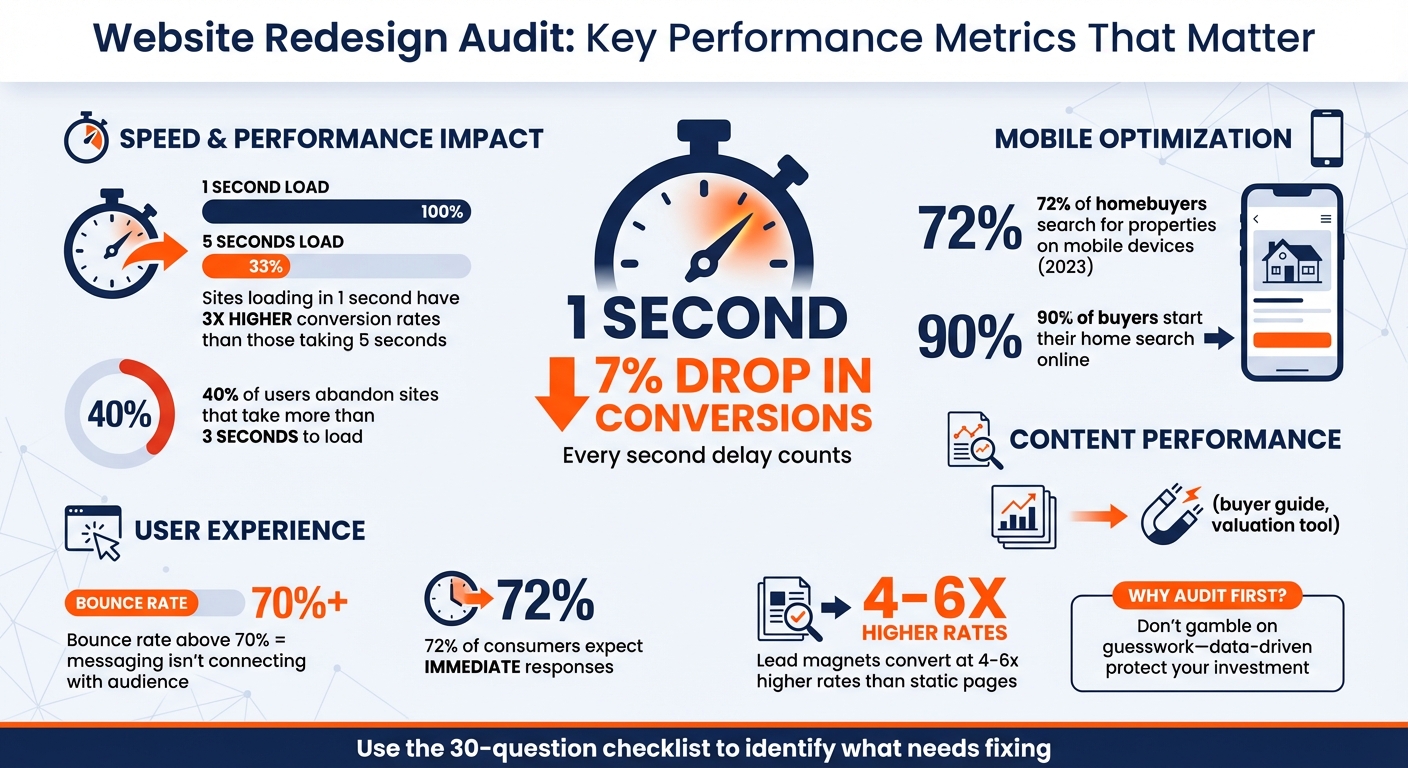
Website Redesign Audit: Key Performance Metrics and Impact Statistics
Section 1: Positioning & Messaging (Questions 1–6)
Is Your Target Audience Clear?
Your homepage has one job: to answer the question, "Is this site for me?" If visitors can’t figure out whether you’re catering to buyers, sellers, investors, or a specific neighborhood, they’re likely to leave. A bounce rate above 70% is a red flag that your messaging isn’t connecting with the right audience [5]. And with 90% of buyers starting their search online [3], you’ve got to make that first impression count.
Tailor your messaging to address your different audiences. For instance, buyers should see tools like property searches and neighborhood guides, while sellers might appreciate instant home value calculators or clear data on recent sales. Adding a seller-focused tool like CT Automated Home Valuations helps immediately signal ‘this site is for homeowners like me,’ which strengthens messaging clarity and increases seller engagement.
Using a crawlable IDX solution like CT IDX Pro+ ensures those buyer-focused search pages are not only usable but also indexable for SEO, helping the right audience find you organically. If you specialize in Miami Beach, for example, highlight specifics like "Waterfront Luxury Condos Under $1M."
When your audience feels seen and understood, you’re already one step closer to establishing trust and showcasing your expertise.
Does Your Site Show Local Knowledge?
Claiming "20 Years of Experience" doesn’t cut it anymore. What clients care about is whether you truly understand their community. Ted Adler, President of Union Street Media, sums it up perfectly:
"Local is the ‘last mile’ of real estate searches that the national aggregators cannot do effectively" [6].
To stand out, replace generic claims with concrete examples of your local expertise. Highlight recent sales in specific neighborhoods, share information about school ratings, commute times, or even upcoming developments. You can also address common client concerns by writing real estate FAQs that highlight your area expertise. For instance, showing you’ve sold homes on "Maple Street, near the new park project", tells clients you know the area inside and out.
This level of detail not only builds trust but also improves your local SEO rankings. When potential clients see you’ve mastered the nuances of their market, they’ll know they’re in good hands.
Does Your Messaging Match How Clients Search?
Once you’ve nailed your audience targeting and local focus, it’s time to ensure your messaging mirrors how clients actually search. A buyer typing "luxury waterfront condos Miami Beach under $1M" is showing serious interest. Yet, too many sites rely on vague terms like "premium properties" or "exclusive listings." Instead, test your headlines to make sure they are Useful, Unique, Urgent, and Ultra-specific for your market [1].
Avoid copying MLS descriptions word-for-word, as this can hurt your search rankings and make your messaging feel generic. Instead, add your own local insights. For example, mention that a property is "three blocks from the new Metro station opening in 2026" or "in the top-rated elementary school district." These unique details not only help search engines but also show potential clients that you’re offering something they won’t find elsewhere.
Section 2: User Experience & Navigation (Questions 7–12)
Can Visitors Find What They Need Quickly?
When someone visits your site to search for homes in a specific neighborhood or find out their property’s value, they shouldn’t have to dig around. Navigation needs to be intuitive. Studies show that keeping your primary navigation menu to fewer than seven links helps avoid overwhelming visitors and makes decision-making faster [1].
Your navigation should act as a guide, making it easy for users to reach key pages within two clicks from the homepage [1]. A well-organized mega menu with clear subheadings can help display links without hiding important pages [1]. Don’t forget to include essential call-to-action (CTA) buttons like ‘Schedule a Tour,’ ‘Search Listings,’ or ‘What’s My Home Worth?’ in your top navigation. Home valuation CTAs are especially effective for sellers and work best when they lead to instant, automated tools such as CT Automated Home Valuations rather than static forms. Use bold, high-contrast colors for these buttons to ensure they stand out. This kind of streamlined navigation also sets the tone for a seamless mobile browsing experience.
Does Your Site Work Well on Mobile?
With most buyers searching for properties on their phones, poor mobile performance isn’t just inconvenient – it’s a dealbreaker. A website that loads in one second can have triple the conversion rate compared to one that takes five seconds [1]. But mobile optimization isn’t just about speed. Forms should be short and easy to fill out, buttons need to be large and tappable, and menus (like hamburger menus) should make accessing key links effortless [1] [7].
To ensure your mobile experience is up to par, test your site on an actual phone. Pay special attention to listing search and detail pages. If your IDX experience feels slow, cluttered, or difficult to use on mobile, that’s a red flag. Modern IDX platforms such as CT IDX Pro+ are built mobile-first, with optimized listing pages, fast image delivery, and touch-friendly filters designed specifically for on-the-go buyers. This hands-on approach will help you identify any friction points and refine the mobile journey.
Are Your CTAs Visible But Not Pushy?
CTAs should guide visitors without overwhelming them. They need to be noticeable but should also fit naturally into your site’s design. Focus on using action-oriented language that aligns with user intent, like ‘Search Homes’ for buyers or ‘What’s My Home Worth?’ for sellers. Pairing seller CTAs with instant valuation tools like CT Automated Home Valuations removes friction by delivering immediate value instead of forcing users into long forms. Placement is key – consider adding a CTA in your top navigation to provide a consistent next step as users explore your site. For example, a "Schedule a Tour" button placed strategically after a user engages with your content can encourage them to take the next step without feeling pressured.
Section 3: SEO & Discoverability (Questions 13–18)
Are Your Pages Indexed and Targeting the Right Searches?
A solid SEO audit begins with checking if your pages are indexed, ensuring your content aligns with search intent, and optimizing for local searches. To start, type site:yourdomain.com into Google. If nothing shows up, you may need to address technical SEO essentials or improve your site’s crawlability [3]. Once indexing is confirmed, review each page to ensure it meets a specific user need. For instance, someone searching for ‘3-bedroom homes Denver’ should land on a dedicated, indexable property search page — not a generic services page. This is where many agent sites fall short. IDX platforms like CT IDX Pro+ generate crawlable listing and search result pages, allowing those high-intent queries to rank instead of being hidden behind JavaScript or iframes.
Watch out for keyword cannibalization. This happens when multiple pages target the same keyword, causing them to compete against each other and lower your rankings [1]. For example, if three pages all aim for "homes for sale in Phoenix", Google may struggle to determine which one to rank. Instead, assign each page a unique focus and keyword.
| Intent | Example Keyword | Page Type |
|---|---|---|
| Transactional (Buyer) | "3-bedroom homes Denver" | IDX Listing/Search Page (indexable with CT IDX Pro+) |
| Transactional (Seller) | "how much is my home worth in Dallas" | Home Valuation Page |
| Informational | "first-time homebuyer programs Phoenix" | Blog Post/Guide |
| Hyper-Local | "luxury waterfront condos Miami Beach" | Neighborhood Landing Page |
Once your pages are indexed and keyword strategies are aligned, the next step is to focus on local optimization.
Are Your Local Pages Optimized?
City and neighborhood pages should highlight your local expertise. Include details like median home prices, days on market, school ratings, walkability scores, and unique features of the area. This type of content helps you rank for hyperlocal searches like "luxury waterfront condos in Miami Beach under $1M", which often face less competition than broader city-level terms.
For URL structure, keep it clear and logical, such as /listings/city/neighborhood/property-name. Ensure that all property listings are indexable and not hidden within iframes or blocked scripts. Many legacy IDX systems fail here. SEO-optimized IDX platforms like CT IDX Pro+ expose listing pages, filters, and pagination to search engines, which is critical for ranking neighborhood and long-tail buyer searches. Craft unique title tags for each neighborhood page (e.g., "Homes for Sale in [Neighborhood Name] | [Your Name] Real Estate") and limit meta descriptions to 160 characters. Use schema markup formats like LocalBusiness, Place, and RealEstateListing to help Google display rich snippets, such as prices and square footage, directly in search results.
Optimizing local pages is key, but don’t overlook the role of internal linking and metadata.
Are Your Internal Links and Metadata Working?
Internal links are crucial for spreading SEO authority across your site and guiding visitors to related content. For instance, link neighborhood pages to relevant blog posts, market updates, or buyer and seller service pages [1].
Every page should have a title tag under 60 characters, an H1 featuring the main keyword, and alt text for images under 125 characters. Consistency in your Name, Address, and Phone number (NAP) across your website, Google Business Profile, and local directories is also critical – discrepancies can negatively impact your rankings. These seemingly small details can make a big difference in driving organic traffic to your site.
Section 4: Content & Page Coverage (Questions 19–23)
Do You Have All the Pages You Need?
Make sure your website includes the basics: About, Contact, Listings, and Community/Neighborhood pages. Your listings section should not be a single generic search page — it should support city, neighborhood, and filter-based pages generated through your IDX. Tools like CT IDX Pro+ automatically create this page depth, which improves both SEO coverage and user experience. These should be easy to find, and contact information should appear in the header or footer of every page for accessibility [8][9].
For navigation, keep it simple – limit primary links to fewer than seven [1]. If your site has a lot of content, consider using a mega menu with clear subheadings to create an organized structure. Also, don’t forget to include clear calls-to-action (CTAs) in your main navigation and on important conversion-focused pages [1].
Does Your Content Answer Client Questions?
Once your essential pages are set, take a step back and ask: does the content on these pages address what your clients actually want to know? Avoid focusing solely on what you want to share. Instead, ensure your content directly tackles their real questions. Adding an FAQ page can be a great way to address common inquiries about legal, financial, or procedural topics that typically come up during consultations [11]. To gauge how well your content performs, use short surveys that gather client feedback [10].
| Content Type | Purpose | Key Elements to Include |
|---|---|---|
| Neighborhood Pages | Local SEO & Expertise | Median home prices, school ratings, local amenities, high-quality area photos |
| Market Updates | Authority & Trust | Monthly or quarterly stats, interest rate impacts, inventory levels |
| Buyer/Seller Tips | Lead Nurturing | Staging advice, mortgage pre-approval steps, closing cost explanations |
| Unique Listings | Engagement & SEO | Custom descriptions, local "walk score" insights, proximity to landmarks |
Is Your Content Up to Date?
Having the right content is only part of the equation – it also needs to stay current. Outdated information can erode trust quickly. As RealtyNinja explains:
"An active (and relevant) blog page shows potential clients that you’re up-to-date on current market trends and activity, whereas an outdated blog is a solid indicator… that you’re not on top of things" [3].
To avoid this, regularly audit your content. Aim for at least five pages of unique content, with each page containing 150–300 words to meet search engine standards [3]. Organize your site into logical categories or hubs, using a clear structure of parent and child pages [1].
Finally, make your content easy to skim by using pre-designed page blocks and subheads that highlight key points. This way, even visitors who only glance through your site can pick up the most important details [1]. Consistency is key, so ensure updates happen regularly over time [3].
Section 5: Conversion & Engagement (Questions 24–27)
Does Every Page Have a Clear Next Step?
Every page should guide visitors with a clear and well-placed call-to-action (CTA) that points them toward their next step. Think strategically about where you place these CTAs – above the fold, mid-page, and at the bottom of pages designed to convert. For instance, if someone visits your seller page, their next step should be requesting a home valuation, scheduling a consultation, or downloading a seller guide. Instant valuation tools like CT Automated Home Valuations consistently outperform static ‘request info’ forms because they provide immediate feedback while still capturing lead details.
Keep your primary CTAs easy to spot, like in the top navigation bar, and limit them to one or two options. This helps avoid overwhelming your visitors with too many choices.
In addition to visible CTAs, explore other ways to make it easier for visitors to engage with your site.
Can Visitors Engage Without Filling Out Forms?
Not everyone likes filling out forms, so it’s smart to offer alternative ways for visitors to engage. While CTAs are essential, having multiple engagement options ensures that even those who avoid forms can still interact. For example, some visitors might want quick answers and won’t bother with a form. If a contact form is your only option, you risk losing potential leads. Add features like live chat or instant scheduling to make engagement frictionless. In fact, 72% of consumers expect immediate responses [1]. By providing these alternatives, you let visitors choose the method that works best for them.
Do You Offer Self-Service Tools?
Self-service tools give users the freedom to interact with your site on their own terms, which can keep them engaged longer. These tools are especially effective when paired with intuitive navigation and prominent CTAs. Features like saved searches, property alerts, and favorites encourage visitors to explore and return to your site. IDX platforms such as CT IDX Pro+ make these tools native to the listing experience, turning casual browsers into registered leads without forcing aggressive forms. Tools such as mortgage calculators, home valuation tools, and interactive maps not only enhance engagement but also position you as a knowledgeable resource. Automated valuation platforms like CT Automated Home Valuations allow sellers to self-qualify while giving you insight into intent, price expectations, and timing. Additionally, lead magnets like buyer guides perform much better than static pages, converting at rates 4–6 times higher [1].
| Feature Type | Examples | Engagement Benefit |
|---|---|---|
| Search Tools | Saved searches, property alerts, advanced filters | Encourages repeat visits and builds long-term loyalty. |
| Lead Magnets | Automated home valuations, buyer guides, market reports | Converts at significantly higher rates than static pages. |
| Communication | AI chatbots, live chat, instant scheduling tools | Addresses the 72% demand for immediate responses. |
| Utility Tools | Mortgage calculators, interactive maps, school ratings | Boosts "time on site" and reinforces expertise. |
Section 6: Performance, Speed & Maintenance (Questions 28–30)
Does Your Site Load Fast on Mobile?
Speed matters – a lot. If your site takes more than three seconds to load, 40% of users will abandon it. With 72% of homebuyers relying on mobile devices to search for properties in 2023, a slow site is simply not an option[12][13][15].
Real estate websites face unique challenges. High-resolution property images, interactive maps, and IDX feeds can significantly slow down load times. A single listing page might feature 20–30 images, making optimization a must[14]. Beyond general load speed, focus on technical metrics like Time to First Byte (TTFB), which should be under 500 milliseconds, and Start Render, which should happen within one second[12].
"3 seconds . . . That’s how long you have before a significant number of web users leave your site, over 40% according to KissMetrics." – Patrick Pohler, Web Developer[12]
Every extra second of load time can cost you – a 7% drop in conversion rates per second, to be exact[13]. On the flip side, sites that load in just one second can achieve conversion rates three times higher than those taking five seconds[16]. Tools like Google PageSpeed Insights, WebPageTest, or GTmetrix can help you identify speed bottlenecks. To improve performance, use techniques like lazy loading and browser caching.
Once your load times are optimized, shift your attention to refining image and plugin performance.
Are Your Images and Plugins Optimized?
Plugins are a double-edged sword. While they add functionality, they can also bog down your site. Stick to only the essentials — like IDX integration, lead capture forms, and analytics. Choosing a feature-complete IDX platform such as CT IDX Pro+ reduces plugin bloat by consolidating search, maps, saved searches, alerts, and lead capture into a single, performance-optimized system. Regularly audit your plugin list and remove anything that doesn’t directly contribute to your site’s core purpose.
Images are another common culprit in slowing down websites. Compress your photos before uploading, and switch to modern formats like WebP, which can reduce file sizes by 25–34% without sacrificing quality[14][15]. Lazy loading ensures images are only loaded as users scroll, while a Content Delivery Network (CDN) speeds up delivery by using servers closer to your visitors.
For additional performance gains, minify your CSS and JavaScript files, and enable GZIP compression to reduce script size. If you’re using WordPress, clean up your database by deleting spam comments, unused plugins, and old post revisions to keep things running smoothly.
Can You Update Your Site Easily?
If making simple updates to your site breaks the layout or requires a developer, it’s a sign your site isn’t built for long-term maintenance. Beyond speed, ease of upkeep is critical. Your site’s code should be scalable, allowing you to add or update content without major headaches[1]. As Tiller Digital puts it:
"Scalable code allows you to easily add, change, edit, and revamp your website content as you grow." – Tiller Digital[1]
A modular back-end structure is key. It lets you add new pages or content components without disrupting your current design. Establish a style guide with consistent colors, fonts, and design patterns to ensure new updates match your brand seamlessly[4]. Also, confirm your site uses HTTPS with a valid SSL certificate to enhance both security and SEO[3].
If routine updates regularly cause issues or require technical assistance, it might be time to rebuild your site from the ground up, rather than just tweaking its appearance.
One Final Checkpoint Before Redesigning
Before deciding whether your site needs minor tweaks or a full rebuild, evaluate the two systems that impact performance and lead generation more than any visual change ever will: your listing search experience and your seller lead capture flow.
If your IDX is slow, non-indexable, or difficult to use on mobile, no amount of visual redesign will fix the underlying problem. Listing search pages influence SEO visibility, page speed, user experience, and conversions all at once. Platforms like CT IDX Pro+ often make the difference between a site that looks good and one that actually generates qualified buyer leads.
The same applies to your seller funnel. If your “What’s My Home Worth?” CTA leads to a basic contact form or an outdated CMA request, you’re likely losing high-intent sellers at the moment of peak interest. Automated tools such as CT Automated Home Valuations convert that curiosity into engagement by delivering instant value while capturing qualified leads — without adding friction.
If either of these systems is weak, a redesign should start there. Otherwise, you risk rebuilding the surface while leaving the foundation untouched.
What Your Answers Mean
Mostly ‘Yes’ Answers: Focus on Small Tweaks
If most of your answers are "yes", your site is in good shape. Instead of overhauling everything, focus on quick, impactful updates that enhance what’s already working.
Start by identifying changes that require minimal effort but deliver noticeable results. For example, repositioning your CTAs for better visibility, sharpening headlines on key pages, or speeding up your site through simple steps like compressing images. Even refreshing meta descriptions can make a difference. These adjustments take little time but can significantly improve your site’s performance.
Avoid making changes purely for aesthetic reasons. If your site is converting visitors, loading quickly, and ranking well, there’s no need for a major visual overhaul. Stick to refining the details while keeping your core structure intact.
Mixed Answers: Address Specific Issues
A mix of "yes" and "no" answers suggests your site has both strengths and weaknesses. While a full rebuild isn’t necessary, targeted improvements are.
Break down the issues into two categories: quick fixes and longer-term projects. Quick fixes might include improving internal links, adding missing CTAs, or optimizing underperforming pages. For long-term projects, consider things like reorganizing your navigation, creating localized content, or adding user-friendly tools like saved searches.
Focus on high-priority issues first. For instance, if your site is slow, remember that even a one-second delay can reduce conversions by 7%[2]. That’s a problem you’ll want to tackle immediately. If your SEO structure needs work but your user experience is solid, prioritize optimizing page titles, metadata, and internal linking before diving into visual updates or integrating a real estate CRM to manage your incoming traffic.
Take it step by step and measure the results of each change. This method is more cost-effective and less risky than a full redesign. However, if certain problems persist, a complete rebuild might eventually be necessary.
Mostly ‘No’ Answers: Time for a Full Rebuild
If your answers are mostly "no", it’s a sign that your site has fundamental issues. In this case, a full rebuild is the only way forward. When starting over, choosing a modern real estate website platform ensures you have the right foundation for growth.
Start by streamlining the decision-making process. Assign a single decision-maker and form a small team of 5–7 people from different departments to guide the project[17]. Early on, make sure you have access to your domain and hosting credentials, and decide which content is worth keeping[17].
A full rebuild isn’t just about appearances. If your site isn’t mobile-friendly, fails to engage users, or feels outdated, surface-level fixes won’t cut it[17]. You need a site that’s built to perform – one that’s fast, scalable, and easy to manage.
Set a realistic budget and timeline. While a complete rebuild takes time, it’s worth the investment if your current site is losing leads. Plan carefully to ensure your new site meets both your immediate needs and future goals.
5 Things Every Real Estate Agent’s Website Needs to Have – Web Design for Realtors
Conclusion
Redesigning a website is no small task – it’s an investment that demands careful planning and clear priorities. The key to success lies in pinpointing the areas that need attention. By evaluating factors like positioning, user experience (UX), SEO, content, engagement, and performance, you can uncover what truly needs to be addressed. As Chantelle Little, Founder & CEO of Tiller Digital, wisely notes:
"When investing in a website redesign, you can’t afford to go on a hunch" [1].
This approach ensures that your decisions are guided by solid data instead of costly guesswork.
Conducting an audit before diving into a redesign is crucial for safeguarding your SEO equity and focusing on fixes that yield immediate results. By documenting metrics such as visits, bounce rate, and domain authority, you establish a baseline to measure the success of your redesign [18]. Without this reference point, it’s impossible to evaluate whether your efforts are paying off.
Armed with clear insights, you can address critical issues like broken links, poorly optimized meta titles, or uncompressed images – quick fixes that can enhance conversions without requiring a complete overhaul. For instance, a one-second delay in page load time can slash conversions by 7% [2]. Tackling such problems now, rather than months down the line, can make a significant difference.
Whether your site needs a few tweaks, targeted updates, or an extensive rebuild, you now have the insights to make informed choices. You know what’s working, what’s broken, and what’s worth keeping. With this knowledge, a redesign stops being a gamble and becomes a calculated move – one that protects your resources, builds on your strengths, and addresses your weaknesses strategically.
FAQs
How do I know if my real estate website needs a full rebuild or just minor updates?
If your website checks off most of the 30 checklist questions with a “yes”, it’s likely in good shape when it comes to positioning, user experience, SEO, content, and performance. In this case, minor updates should do the trick. But if you’re seeing mostly “no” responses – especially in critical areas like site structure, SEO, or loading speed – it might be time to consider a complete rebuild.
Some clear red flags include:
- A design or branding that feels outdated
- Pages taking longer than 3 seconds to load
- Poor functionality on mobile devices
A full rebuild can bring your site up to speed, ensuring it’s modern, efficient, and ready to meet the demands of today’s real estate market.
What are the essential components of local SEO for real estate websites?
To make your real estate website stand out locally, you need to focus on a few essential strategies that improve visibility and attract nearby buyers and sellers. Start by building a solid technical foundation. This means having clean URL structures, an XML sitemap, breadcrumb navigation, and reliable hosting. These elements make it easier for search engines to crawl and index your pages effectively.
Incorporate hyper-local, long-tail keywords into your content. Phrases like “homes for sale in [neighborhood]” or “first-time buyer guide [city]” work well in page titles, meta descriptions, headings, and on-page content. They help you target specific searches and connect with users looking for services in your area.
Another key tactic is creating dedicated neighborhood landing pages. These pages, paired with community-focused blog posts, showcase your local expertise and act as content hubs that draw organic traffic. Given that many real estate searches happen on mobile devices, ensure your site is mobile-friendly and optimized for fast loading. Slow pages can drive potential leads away.
Don’t forget to integrate IDX tools so property listings are crawlable and can appear in search results. Also, use internal linking wisely – link blog posts to neighborhood pages and connect property listings to service pages. This not only improves navigation for users but also strengthens your site’s relevance to local topics.
By focusing on these strategies, you’ll be well-positioned to attract high-quality leads in your target area.
How can I make my website’s CTAs more visible and effective?
To make your website’s calls-to-action (CTAs) stand out and perform well, focus on a few essential strategies:
- Position them where they’ll be seen: Place primary CTAs in prominent spots, like above the fold on your homepage or landing pages. This ensures visitors can spot them without scrolling. Keep the placement consistent for actions tailored to buyers or sellers, so navigation stays intuitive.
- Make them pop visually: Use button colors that contrast sharply with the background to grab attention. Pair this with bold, easy-to-read text. Stick to a consistent size and shape for buttons across your site to maintain a polished appearance.
- Write clear, action-focused text: Use concise phrases that spell out the next step, such as "Schedule a Tour" or "Get a Free Home Valuation." Steer clear of generic terms like "Click Here" and keep the wording short and actionable.
- Ensure mobile-friendliness: Design buttons that are big enough to tap easily on a smartphone. They should also remain fully visible without requiring users to scroll sideways. Test your CTAs on multiple devices to confirm they work seamlessly.
By following these steps, your CTAs will catch the eye, guide users effectively, and encourage action – all without overwhelming your visitors.


